
- Acest eveniment a trecut.
Ateliere Muzeul Naţional de Artă Contemporană – București pentru acasă | #selfielandscape360˚
Please scroll down for English.
/RO: În cadrul Atelierelor MNAC pentru acasă, Muzeul Național de Artă Contemporană continuă seria activităților creative propuse copiilor prin programul Weekend la MNAC, adaptate pentru a se desfășura în intimitatea locuinței, alături de cei dragi. Săptămâna aceasta artista Crina-Ioana Athanasiu propune un atelier similar selfie-ului animat la 360 de grade.
Crina-Ioana Athanasiu este grafician și artist plastic. Trăiește și lucrează în București, unde susține, de asemenea, programe de educație plastică și cursuri de artă pentru copii.
Dacă în atelierul de acum două săptămâni rotația se realiza în jurul portretului – din față, spre profil, spate și iar în față – de data aceasta ne mutăm atenția asupra spațiului în care ne aflăm, figura rămâne, mereu, în plan frontal, la punct fix. Rezultatul va fi o imagine completă a spațiului în care te afli, interior sau exterior.
Această animație implică o serie de fotografii realizate de jur-împrejurul subiectului, apoi unite, pentru a obține o rotație cursivă. Poți, bineînțeles, folosi și alt subiect – mâna, o păpușă sau un personaj desenat, pe care să îl fotografiezi în rotație completă.
Atelier pentru acasă
Inspirați de artiști contemporani la MNAC
#21 #selfielandscape360˚
Materiale de care vom avea nevoie:
● Cameră foto sau telefon cu o cameră foto. Opțional: selfie stick.
● Orice aplicație de editare a imaginii (Google Play pentru Android sau App Store pentru iPhone).
● Internet sau date pentru distribuirea pe rețelele sociale preferate (Tik-Tok, Instagram).
Cum pregătim materialele pentru animație:
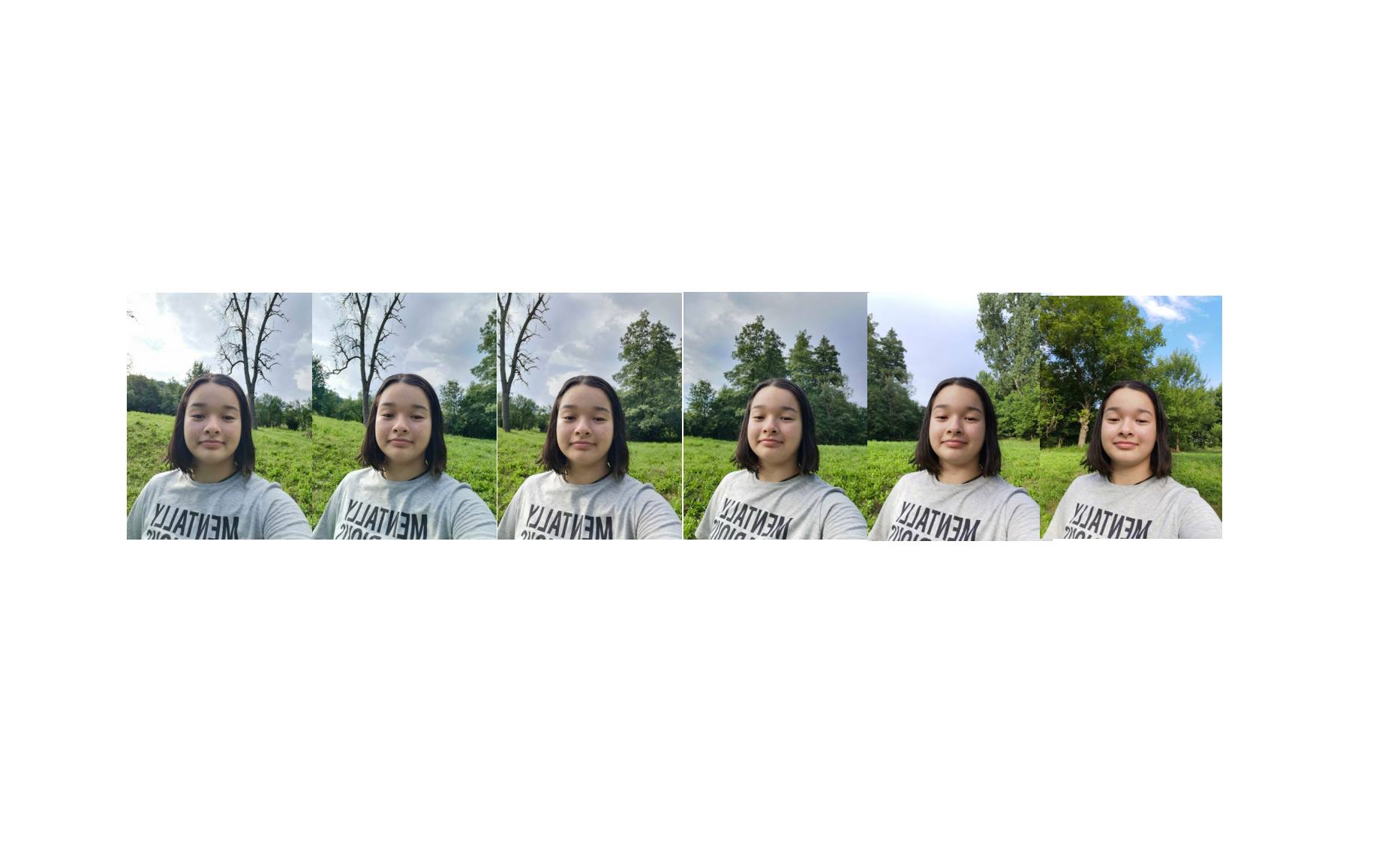
● Realizează o serie de fotografii portret, menținând mereu constant unghiul și distanța dintre camera foto (telefon) și tine.
● Alege un reper în spațiu.
● Începe prin a face o fotografie în dreptul acestui reper. Continuă apoi spre dreapta sau stânga, realizând fotografii până revii la punctul din care ai plecat (ca în exemplul din imagine).
Tips&tricks:
● Încearcă să păstrezi cât mai mult posibil din peisaj. Astfel experimentezi cu proporția dintre portret și fundal, dar și cu unghiul fotografiilor (mai mult cer sau tavan vs. mai mult din clădiri sau pereți).
● Poți realiza aceste fotografii fără a mișca mâna care ține telefonul cu camera, fără a răsuci capul. Încearcă să te învârți cu pași mici pe loc. Dacă păstrezi același unghi rotația iese cursivă.
● Poți face și portretul unui prieten sau mai mulți membrii ai familiei, o păpușă, un personaj desenat, un obiect, mâna sau piciorul etc.
● Dacă te ajută, majoritatea telefoanelor au opțiunea „panorama” – exeprimenteaz-o!
E bine să faci 24 – 30 de poze, ca să ai de unde alege!
Cum realizăm animația:
Pasul 1: O animație se realizează unind, într-o aplicație specifică, o serie de cadre – fotografice. Imaginile se vor succeda cu repeziciune, într-o imagine unică, animată.
Pasul 2: Folosește orice aplicație free care unește imaginile, salveaz-o GIF, MP3, sau MP4 și ești gata să o distribui!
Pasul 3: Unește-le urmând pașii… selfie-ul 360 ̊ este gata! Acum poți să-l adaugi și să-l distribui pe canalul tău preferat de comunicare.
Suntem interesați și foarte curioși de rezultat, așa că, te invităm să îl trimiți și la adresa educatie@mnac.ro. Distracție plăcută!Un nou atelier va fi publicat joi.
/EN: In the frame of the MNAC Bucharest Take-away Workshop series, the National Museum of Contemporary Art continues the activities for kids proposed by the Weekend at MNAC Bucharest program, adapted to take place within the privacy of your home, together with the loved ones. This week artist Crina-Ioana Athanasiu proposes a workshop similar to the 360-degree animated selfie.
Crina-Ioana Athanasiu is a graphic and fine artist. She lives and works in Bucharest, where she also holds art education programs and art classes for children.
If in the workshop two weeks ago the rotation was done around the portrait — from the front, to the profile, and all the way to the back — this time we will focus on the space we are in. The central character always remains in the front, at a fixed point. The result will be a complete picture of the space you are in, indoors or outdoors.
This animation involves a series of photographs taken around the subject, then joined together, to obtain cursive rotation. You can, of course, use another subject – a hand, a doll or a drawn character, which you can photograph in rotation.
MNAC Bucharest Take-Away Workshop
Inspired by the contemporary artists presented at MNAC Bucharest
#21 #selfielandscape360˚
Recommended for: children aged 5 and up and adults.
The instructions below are illustrated in the Discussions section of the event.
You will need:
● A camera or a smartphone. Optional: a selfie stick.
● Any image editing application (check out Google Play for Android or App Store for iPhone).
● Internet or data for distribution on your favourite social networks (Tik-Tok, Instagram).
Prepare your animation basics:
● Take a series of portrait photo, always keeping the angle and distance between the (phone) camera and you constant.
● Choose a landmark in space.
● Start by taking a photo next to this landmark. Then continue to the right or left, taking photos until you get back to where you left off (as pictured).
Tips & Tricks:
● Try to keep as much of the landscape as possible. Thus you experiment with the proportion between the portrait and the background, but also with the angle of the photos (more sky or ceiling vs. more of buildings or walls).
● You can take these photos without moving your hand holding the phone or the camera, without turning your head.
● Try to turn taking small steps on the spot. If you keep the same angle, the rotation is cursive.
● You can also take a portrait of a friend or of several family members, a doll, a cartoon, an object, a hand or a foot, etc. If it helps, most phones have a „panorama” option – experiment with it!
We recommend you take 24-30 pictures, so you have plenty to choose from!
How to make the animation:
Step 1: An animation is made by using a specific image processing application, that helps with joining a series of photographic frames. The images will follow one another quickly, creating a unique, animated image.
Step 2: Use any free application that joins images together by following a series of simple steps. Save your result in GIF, MP3, or MP4 format and you’re ready to share!
Step 3: Join them following the steps and… the 360 ̊ selfie is ready! Now you can share it to your favourite communication channel.
We are interested and very curious about your results, so we invite you to show them to us at educatie@mnac.ro. Have fun! A new workshop will be published on Thursday.